Operated by EdgeCraft AI, Inc. (United States) · Last updated: October 19, 2026
This page shows exactly how CollabMe users give SMS consent. No login is needed to view it. CollabMe sends two kinds of text messages, each with its own permission. CollabMe does not send marketing or promotional text messages.
Where the phone number is entered
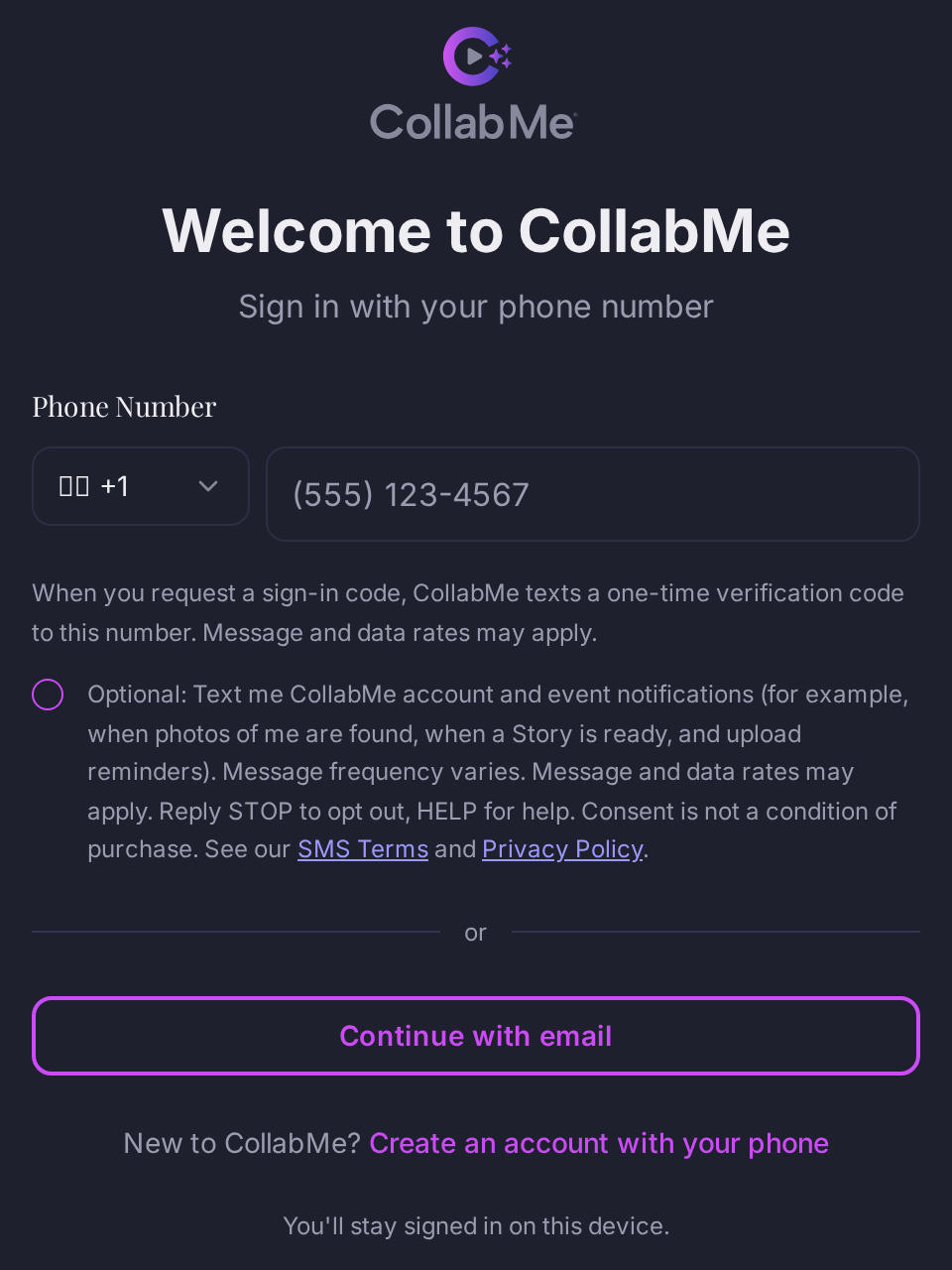
The live CollabMe sign-in screen (collabme.com/login). The same disclosure and unticked checkbox appear on sign-up, guest join, phone verification and Settings → Phone.
The user types their mobile number into the Phone Number field.
Directly below the field they see the verification-code disclosure (1 below).
Below that is a separate, unticked checkbox for ongoing account/event notifications (2 below). It is optional.
The user requests a code. CollabMe texts only that one-time code.
CollabMe sends ongoing notifications only if the user ticked the box (or later turns them on in Settings → Phone). Signing in, signing up, joining an Event or buying never requires it.
1. Verification codes (sent when requested)
When you request a sign-in code, CollabMe texts a one-time verification code to this number. Message and data rates may apply.
A code is only sent when the user asks for one. Receiving a code does not sign the user up for any other texts.
2. Account and event notifications (optional, unticked by default)
Optional: Text me CollabMe account and event notifications (for example, when photos of me are found, when a Story is ready, and upload reminders). Message frequency varies. Message and data rates may apply. Reply STOP to opt out, HELP for help. Consent is not a condition of purchase. See our SMS Terms and Privacy Policy.
The box starts unticked. If left unticked, the user can still sign in, sign up, join an Event and buy. CollabMe records the source and time of each tick. A phone number typed in by someone else (for example an Event host naming a guest) is never treated as consent.
Messages you may receive
Type
When
Sample
Verification code
Only when requested
"1234 is your CollabMe verification code. Reply STOP to opt out, HELP for help. Msg&data rates may apply."
Photo found (optional)
After the box is ticked
"CollabMe: Hi Sam, you've been spotted in 3 new photos from Ava & Leo's Wedding. See yours: https://collabme.com/… Reply STOP to opt out of all texts, HELP for help. Msg&data rates may apply."
Event reminders (optional)
After the box is ticked
"CollabMe: Last call to share any moments for Ava & Leo's Wedding. Upload here: https://collabme.com/… Reply STOP to opt out, HELP for help. Msg&data rates may apply."
Costs and frequency
Message and data rates may apply.
Message frequency varies by account activity and Event participation, typically 1 to 10 messages per month.
Opt out and help
Reply STOP to unsubscribe. You receive one confirmation: "You are unsubscribed from CollabMe and will receive no more messages. Reply START to resubscribe."
Reply HELP for help. You receive: "CollabMe: For help, email support@collabme.com or visit https://collabme.com/support. Reply STOP to unsubscribe. Msg & data rates may apply."
Notifications can also be switched off anytime in Settings → Phone.
START or UNSTOP only resubscribes a number that previously replied STOP. They are not a way to sign up.
A2P 10DLC SMS privacy disclosure: We do not share, sell, or otherwise provide your mobile phone number or messaging consent information to any third parties or affiliates for marketing or promotional purposes. Information sharing to subcontractors in support services, such as customer service, is permitted. All other categories exclude text messaging originator opt-in data and consent; this information will not be shared with any third parties.